
Introduction to Resetting Whirlpool Duet Washer
The Whirlpool Duet washing machine is known for its advanced features and efficiency. However, like all machines, it can show error codes or stop working correctly. Knowing the proper reset process helps fix many issues quickly. This article covers how to reset your Whirlpool Duet washer safely and effectively in 2026.
Before starting, it’s good to understand why resets are needed. They clear error messages and refresh the control board. For more on washing machine basics, exploring how to machine wash different items can be helpful.
For a deeper understanding of this mechanic, analyzing resources on resetting washers provides excellent foundational context.
Basic Reset Steps for Whirlpool Duet Washer
A simple reset often solves minor glitches. Start by turning off the washer and unplugging it from power. Wait about one minute to clear the control board’s memory. Then plug it back in and turn the machine on.
This method is sometimes called a soft reset Whirlpool Duet washer. It resets the control panel and timer without affecting settings. If the washer still shows errors, you may need a more advanced reset.
Keep in mind, a hard reset may clear saved cycle settings, so use it only if necessary.
Resetting Whirlpool Duet After Power Outage
Power outages can disrupt your washer’s operation. To reset after an outage, unplug the machine for one to two minutes. This step resets the control board and restores normal function. Plug the washer back in and check if it starts properly.
If the washer won’t start after this, try pressing the start button again. Sometimes the door lock needs to reset, which happens during this power cycle.
Persistent issues may require accessing the diagnostic mode or a factory reset.
Using Diagnostic Mode Reset
Whirlpool Duet washers have a diagnostic mode to help with troubleshooting. Enter this mode by turning the cycle selector knob through specific positions listed in your user manual. This lets you view error codes and reset them.
Clearing error codes via diagnostic mode resets the control board and helps fix issues like the washer timer needing a reset or door lock errors. Follow your manual’s instructions carefully to avoid changes to settings you want to keep.

This mode also helps identify mechanical problems you might need to fix manually.
Below is a typical sequence used to enter diagnostic mode for many Whirlpool Duet washers:
| Step | Action |
|---|---|
| 1 | Turn dial to “Drain/Spin” |
| 2 | Turn dial to “Cold Wash” |
| 3 | Turn dial to “Drain/Spin” |
| 4 | Turn dial to “Cold Wash” |
| 5 | Press Start/Pause button |
Once in diagnostic mode, you can reset error codes or perform tests.
How to Perform a Hard Reset Whirlpool Duet Washing Machine
Sometimes a hard reset is needed to fix persistent errors. This involves unplugging the washer and pressing the power button for 10 seconds to discharge residual power. Then plug the machine back in and power it on.
This resets the control board completely, including cycle memory and timer. Be aware it clears all custom settings and returns the washer to factory defaults.
Hard resets fix many electrical or software glitches but should be followed by checking the door lock and control panel for faults.
Reset Washer Door Lock Whirlpool Duet
The door lock is a common source of errors. To reset it, first power off and unplug the washer. Wait a minute, then plug it in and power on. This resets the door lock control board.
If the lock still won’t release or lock properly, inspect the latch for damage or debris. In some cases, replacing the door lock assembly may be necessary.
Proper door lock function is key for safety and cycle operation.
Common Whirlpool Duet Washer Error Codes and Troubleshooting
Error codes help identify issues quickly. Some common codes include:

- ✅ F21 – Water fill time out
- ✅ F9 – Door lock error
- ✅ F8 – Heater error
Resetting the washer often clears these codes temporarily. Persistent codes may mean a part needs service or replacement.
Below is a quick reference table for common error codes and simple fixes:
| Error Code | Meaning | Basic Fix |
|---|---|---|
| F21 | Water fill timeout | Check water supply and reset washer |
| F9 | Door lock error | Reset door lock or inspect latch |
| F8 | Heater error | Inspect heating element and reset |
Always refer to the user manual for your model for full error code lists and repair instructions.
Maintenance Reset and Best Practices
Regular maintenance helps prevent errors. Clean the detergent dispenser, door seal, and filter. Run a cleaning cycle monthly to remove buildup.
After maintenance, a reset can clear any error messages related to blocked hoses or sensors. This keeps your washer running smoothly longer.
For cleaning advice, see our guide on how to clean Whirlpool Duet washing machine.
Control Panel and Timer Reset
If the control panel becomes unresponsive, a reset may help. Unplug the washer, wait 60 seconds, then plug it back in. Press the power button to restart.
To reset the washer timer, use the diagnostic mode or perform a hard reset. This clears stuck timers and restores normal operation.
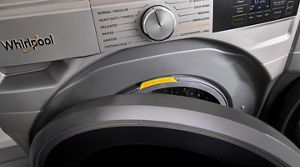
Control panel resets often fix issues with buttons not responding or cycles not starting.
Factory Reset Whirlpool Duet Washer
A factory reset wipes all settings and returns the machine to original defaults. Enter diagnostic mode and follow steps to clear memory. This is a last resort for persistent issues.
Factory resets help when software errors block normal use, but they erase custom wash cycles and preferences.
After a factory reset, you will need to set up your preferences again.
Conclusion
Resetting your Whirlpool Duet washing machine is a key troubleshooting step. From soft resets after power outages to hard and factory resets, these processes clear errors and restore function.
Understanding how to reset the control board, door lock, and timer helps maintain your washer’s performance. Regular maintenance and cleaning reduce the need for resets.
For specific model advice, always consult your user manual or official Whirlpool support. Also consider learning about how to machine wash different fabrics for better care of your laundry.
With these tips, you can keep your Whirlpool Duet washing machine running well into 2026 and beyond.
| Reset Type | When to Use | Effect |
|---|---|---|
| Soft Reset | Minor glitches, after power outage | Clears control board memory |
| Hard Reset | Persistent errors, unresponsive control panel | Resets control board and timer, clears settings |
| Factory Reset | Severe software issues | Resets to factory defaults, erases preferences |
Maintaining your Whirlpool Duet with proper resets and cleaning ensures long-term reliability and fewer repairs.
Frequently Asked Questions
How do I reset error codes on a Whirlpool Duet washer?
To reset error codes, you can perform a power cycle by unplugging the washer for one minute, then plugging it back in. For persistent codes, use the diagnostic mode reset as explained in the manual.
What is the difference between a hard reset and a soft reset on Whirlpool Duet washers?
A soft reset usually involves turning the washer off and on or unplugging it briefly. A hard reset may require holding specific buttons or accessing diagnostic mode to restore factory settings.
How do I reset the door lock on my Whirlpool Duet washing machine?
To reset the door lock, unplug the washer for a minute to clear the control board, then plug it back in. If the door lock error persists, manually checking the door latch for faults is advised.
Can I reset my Whirlpool Duet washer after a power outage?
Yes, after a power outage, unplug the machine for a minute to reset the control board. If error messages remain, use the washer’s diagnostic mode reset to clear issues.
Where can I find the manual reset procedure for my Whirlpool Duet model?
The manual reset procedure is usually found in the user manual or on the Whirlpool website. For detailed help, Whirlpool’s support pages provide step-by-step guides.

Roger Jacobs is a seasoned appliance expert with over 15 years of experience in the washing machine industry. He specializes in product reviews, energy efficiency, and innovative washing technologies, providing users with trustworthy insights to make informed purchasing decisions.